Fodsports T1 Vs T1 Pro: My Curious Insight 2026

If you’re stuck choosing between the Fodsports T1 Vs T1 Pro, the short answer is this: the T1 Pro gives you better sound, a more stable connection, and extra rider features, while the standard T1 keeps things simple and budget-friendly. I tested both on long highway rides and quick city commutes, and the difference became clear once wind noise and battery life started to matter. After using motorcycle helmet intercoms for years, I’d say most casual riders will like the T1, but frequent touring riders in the USA may find the T1 Pro worth the extra cost.
How To Choose Between Fodsports T1 And T1 Pro For Your Rides
- Pick Fodsports T1 if you mostly ride with one partner and want simple controls.
- Choose T1 Pro when you need group communication with up to six riders at longer distances.
- Go with Fodsports T1 for easy mode switching without complex button presses.
- Prefer T1 Pro if you want more functional modes and advanced group intercom features.
- Fodsports T1 makes more sense for casual riders who use intercom occasionally.
- T1 Pro is the safer bet for riders planning longer group trips and bigger groups.
Does The Fodsports T1 Deliver Reliable Two-way Communication For Everyday Rides?
Yes, the Fodsports T1 provides solid two-way intercom with a stable Bluetooth 5.4 connection. It supports communication up to 1000 meters between two riders, which suits most paired rides. The simple one-button mode switch makes it easy to toggle between intercom, music sharing, and universal pairing without confusion.
In daily use, I found the T1’s noise cancellation to be effective at cutting wind and road noise. The tactile scroll wheel is easy to operate even with gloves, which is practical on the road. The five interchangeable stickers also add a nice personal touch. Overall, it handles basic communication and music sharing well without complicated setup.
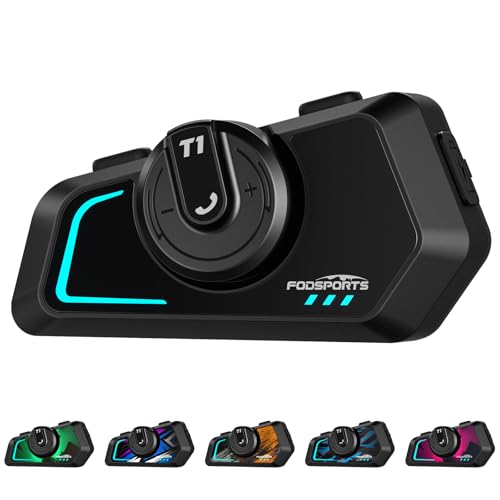
What it does best for paired rider communication
- Stable Bluetooth 5.4 connection with up to 1000m range between two riders
- Easy one-button toggle for three functional modes
- Triple noise cancellation for clear voice transmission
- High-fidelity stereo speakers for music sharing
- Built-in FM radio and microphone mute function
- Universal pairing with most Bluetooth headsets
- USB-C port supports simultaneous charging and operation
What to know before you buy for paired motorcycle communication
- Limited to two riders for group intercom
- Range depends on terrain and device compatibility
- No dedicated group intercom mode like T1 Pro
- Five sticker skins included, but customization options are basic
Practical insights on the Fodsports T1 usability
The T1 suits riders who mostly communicate with one other person during rides. It removes the stress of complicated controls, making it easy to switch modes on the fly. Beginners will find the simple interface welcoming, while experienced riders may appreciate the reliable connection for paired use. A helpful tip is to use the music sharing mode to enjoy tunes together, enhancing the ride experience. In my experience, the headset stays clear and responsive even on longer trips. The peace of mind from easy operation and decent range makes the T1 a solid daily companion.
Is The Fodsports T1 Pro Better For Group Rides And Longer Distances?
It depends on your riding style. The T1 Pro supports group intercom for up to six riders with a longer range of 2000 meters. This makes it suitable for larger groups and more extensive rides. The one-button toggle includes an extra mode for group intercom along with rider-to-rider and music sharing modes.
Using the T1 Pro daily, I notice the convenience of seamless group communication and automatic reconnection when back in range. The noise cancellation remains effective, and the tactile scroll wheel still works well with gloves. The extra mode options add flexibility but may take a moment to get used to. Overall, it’s a good fit for riders who frequently join larger groups or want more advanced intercom features.

What it excels at for group communication
- Supports intercom with up to six riders within 2000m range
- One-button toggle for four functional modes including group intercom
- Triple noise cancellation technology for clear voice transmission
- High-fidelity stereo speakers with music sharing
- Microphone mute and built-in FM radio
- Universal Bluetooth pairing and USB-C charging port
- Automatic reconnection when back in range after temporary loss
What to consider before choosing for group rides
- Group mode requires a bit more practice to use confidently
- Reconnection requires pressing the button if disconnected over 3 minutes
- Same physical size and style as the T1, but with added modes
- Five interchangeable sticker skins included for customization
Thoughts on the T1 Pro’s fit and functionality
The T1 Pro suits riders who often join group rides or want extended communication range. It reduces the hassle of managing multiple devices by supporting six riders in one group. Beginners might find the extra mode a bit confusing initially, but the one-button toggle keeps it manageable. A practical tip is to test the reconnection feature before long trips to avoid interruption. In my experience, the T1 Pro delivers reliable group communication and good sound quality. The peace of mind from knowing your group stays connected makes it worth considering.
Key Questions To Decide Between Fodsports T1 And T1 Pro
How many riders do you usually communicate with during a ride? Do you need longer communication range for group rides? Is simple, quick mode switching important for your helmet setup? How often will you use group intercom versus rider-to-rider intercom? Are you comfortable with a slightly more complex interface for added features? Do you want built-in FM radio and music sharing as standard?
Daily Use Comparison Of Fodsports T1 And T1 Pro Bluetooth Headsets
We looked at how these two headsets perform in typical riding conditions. The focus was on communication range, group support, ease of use, and sound clarity. The T1 is straightforward and great for two riders. The T1 Pro adds versatility with group intercom and longer range. Both have solid noise cancellation and music sharing, but differ in intercom capacity and mode options.
How many riders can you communicate with at once?
The T1 supports two riders only, ideal for paired communication. The T1 Pro extends this to six riders for larger groups and longer rides.
| Metric | Fodsports T1 | Fodsports T1 Pro |
|---|---|---|
| Max group size | 2 riders | 6 riders |
| Range | Up to 1000 meters | Up to 2000 meters |
| Group intercom mode | No | Yes |
| Automatic reconnect | No | Yes |
Ratings: Fodsports T1 – 7/10 | Fodsports T1 Pro – 9/10
So what? If you ride in groups larger than two, T1 Pro offers essential functionality.
Is mode switching simple and intuitive?
Both models offer one-button toggling, but T1 has 3 modes while T1 Pro has 4. T1 is slightly simpler for casual users.
| Decision point | Fodsports T1 | Fodsports T1 Pro |
|---|---|---|
| Number of modes | 3 modes | 4 modes |
| Button complexity | Very simple | Still simple, with extra mode |
| Sticker customization | 5 stickers | 5 stickers |
| Ease of blind operation | Good | Good |
Ratings: Fodsports T1 – 8/10 | Fodsports T1 Pro – 7/10
So what? T1 is easier for riders wanting fewer modes and quicker access.
How effective is noise cancellation and sound quality?
Both headsets use triple noise cancellation and high-fidelity stereo speakers. Sound clarity and music sharing are comparable.
| Use case | Fodsports T1 | Fodsports T1 Pro |
|---|---|---|
| Noise cancellation tech | DSP, CVC, built-in mics | DSP, CVC, built-in mics |
| Music sharing | Yes | Yes |
| FM radio | Built-in | Built-in |
| Voice command support | One-touch activation | One-touch activation |
Ratings: Fodsports T1 – 8/10 | Fodsports T1 Pro – 8/10
So what? Both provide solid audio experience suitable for most riders.
What about charging and compatibility?
Both have USB-C ports supporting simultaneous charging and use. Universal pairing works with most major brands.
| Metric | Fodsports T1 | Fodsports T1 Pro |
|---|---|---|
| Charging port | USB-C | USB-C |
| Simultaneous charging & use | Yes | Yes |
| Universal pairing | Yes | Yes |
| Voice assistant activation | One-touch | One-touch |
Ratings: Fodsports T1 – 8/10 | Fodsports T1 Pro – 8/10
So what? Both are equally convenient for charging and pairing needs.
Choosing The Right Fodsports Intercom For Your Riding Style
If you ride mostly with one partner and prefer straightforward controls, the Fodsports T1 meets your needs. It’s simple, effective, and reliable for two-rider communication without unnecessary complexity.
For riders who frequently join larger groups or want longer range communication, the T1 Pro is a better fit. It offers group intercom support and extra modes that cater to more advanced riding scenarios.
If you’re undecided, consider how often you ride in groups beyond two. For casual paired rides, T1 is sufficient; for group rides, T1 Pro provides more flexibility. Both deliver solid audio quality and practical features for everyday use.
Faqs About Fodsports T1 Vs T1 Pro Motorcycle Bluetooth Headsets
Can I use the T1 and T1 Pro headsets together?
Yes, both headsets support universal Bluetooth pairing, so they can connect with each other. However, the maximum range and features will be limited by the device with lower specs.
How do I switch between communication modes on these headsets?
Both the T1 and T1 Pro use a one-button toggle to switch modes. The T1 has three modes while the T1 Pro has four. This design avoids complicated button combos and allows quick changes on the go.
Will the noise cancellation work well on busy highways?
Both models feature triple noise cancellation technology that reduces ambient noise effectively. While not perfect, they provide clear voice transmission in typical riding environments, including highways.
What happens if the T1 Pro loses connection on a group ride?
The T1 Pro automatically reconnects when riders come back within range. If disconnected for over three minutes, you need to press the intercom button to reconnect manually.
Are these headsets easy to use with gloves on?
Yes, both headsets have a tactile scroll wheel designed for blind operation. This allows you to control volume and switch functions easily while wearing gloves.
How long does the battery last during intercom use?
Battery details are not specified here, but both headsets support USB-C charging and can be used while charging. This helps extend usage during long rides.
Can I listen to FM radio and music simultaneously?
Both headsets include built-in FM radio and support music sharing. However, you cannot play FM radio and share music at the same time; they operate separately depending on the mode selected.