How to Install Cardo Packtalk Edge: Step by Step Guide 2026

This guide walks you through how to install Cardo Packtalk Edge on your motorcycle helmet in 2026. You’ll get clear steps, helpful tips, and troubleshooting advice to ensure a secure, reliable connection for seamless communication on the road.
How to Install Cardo Packtalk Edge in 2026: Step by Step Guide
If you’re a motorcyclist in 2026 looking to upgrade your ride with hands-free communication, the Cardo Packtalk Edge is one of the best Bluetooth intercom systems on the market. With crystal-clear audio, long-range connectivity, and rugged weather resistance, it’s designed for riders who demand reliability and performance. But even the best tech isn’t helpful if it’s not installed correctly.
In this guide, you’ll learn exactly how to install Cardo Packtalk Edge on your helmet—whether you’re a beginner or a seasoned rider. We’ll walk you through every step, from unboxing to final testing, with practical tips and troubleshooting advice. By the end, you’ll have a secure, comfortable, and fully functional setup ready for your next adventure.
What’s in the Box?
Before you start, make sure your Cardo Packtalk Edge package includes:
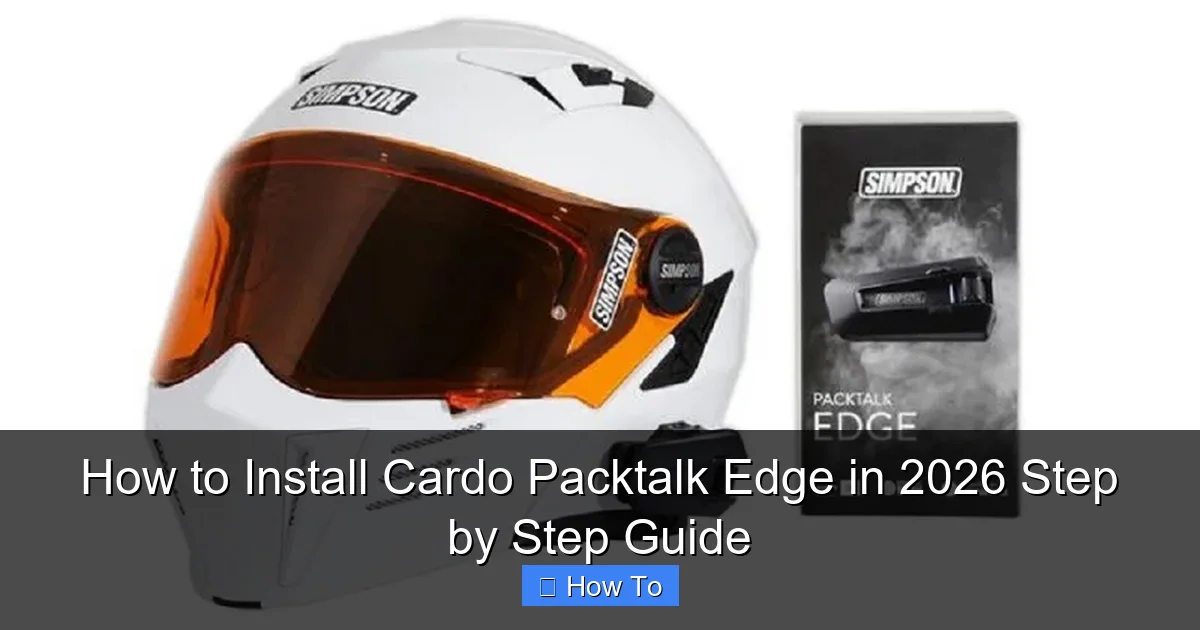
Visual guide about How to Install Cardo Packtalk Edge in 2026 Step by Step Guide
Image source: cyclenews.com
- Cardo Packtalk Edge unit
- Clamp mount with rubber pads
- Adhesive mount (for helmets without space for clamps)
- Two dynamic boom microphones (short and long)
- Two 32mm and two 40mm speaker pads
- USB-C charging cable
- Velcro cable ties
- Quick start guide
Having all components ready will make the installation smoother. If anything is missing, contact Cardo support immediately.
Step 1: Choose the Right Mounting Method
The Packtalk Edge offers two mounting options: the clamp mount and the adhesive mount. Your choice depends on your helmet design.
Clamp Mount (Recommended for Most Helmets)
The clamp mount attaches to the side of your helmet using a sturdy metal clamp. It’s ideal for full-face and modular helmets with flat side surfaces.
- Open the clamp and position it on the left or right side of the helmet shell.
- Use the included rubber pads to protect the helmet finish and improve grip.
- Tighten the clamp gently—don’t overtighten, as it can damage the helmet.
Adhesive Mount (For Low-Profile or Carbon Helmets)
If your helmet has a curved surface or you prefer a cleaner look, use the adhesive mount.
- Clean the mounting area with alcohol wipes (included or use isopropyl alcohol).
- Peel off the adhesive backing and press firmly for 30 seconds.
- Let it cure for at least 2 hours before attaching the unit.
Pro Tip: The adhesive mount is permanent. Only use it if you’re sure you won’t switch helmets often. For more on helmet care, check out our guide on how to clean motorcycle helmet pads.
Step 2: Attach the Packtalk Edge Unit
Once the mount is secure, it’s time to attach the main unit.
- Slide the Packtalk Edge into the mount until it clicks into place.
- Ensure the power button and volume controls are accessible.
- Rotate the unit slightly if needed for optimal button reach.
The unit should feel snug and not wobble. If it moves, double-check the mount tightness or adhesive bond.
Step 3: Install the Speakers
Clear audio starts with proper speaker placement. The Packtalk Edge includes two sizes of speaker pads to fit most ear cavities.
Step-by-Step Speaker Installation
- Remove the helmet’s cheek pads or ear pockets (if removable).
- Insert the 32mm or 40mm speakers into the ear cavities. Use the larger size if you wear glasses or have deeper ear wells.
- Position the speakers so they sit just in front of your ears—not directly on them.
- Reattach the cheek pads, ensuring the speakers stay in place.
Important: Avoid pressing the speakers hard against your ears. This can cause discomfort on long rides. If you wear glasses, consider our tips on how to create glasses space in motorcycle helmet to reduce pressure.
Step 4: Connect the Microphone
The Packtalk Edge includes two boom microphones: a short one for tight helmets and a long one for more space.
Microphone Placement Tips
- Route the microphone cable along the inside of the helmet lining.
- Position the mic 5–10mm from the corner of your mouth—close enough to pick up your voice, but not so close it touches your lips.
- Use the included Velcro ties to secure excess cable.
- For full-face helmets, tuck the mic under the chin bar padding.
Pro Tip: Test the mic by speaking normally. If background noise is too loud, adjust the position slightly or enable noise cancellation in the app.
Step 5: Secure and Route Cables
Loose cables can snag or flap in the wind, causing distractions or damage. Keep everything tidy.
- Use the included Velcro ties to bundle speaker and mic cables.
- Tuck wires into helmet padding channels or under the liner.
- Avoid sharp bends or pinching cables, which can break internal wires.
- Ensure the charging port remains accessible for easy charging.
For riders who frequently remove their helmets, consider using a helmet lock to prevent theft and cable strain.
Step 6: Pair with the Cardo App
The Cardo Packtalk Edge works best when paired with the official Cardo Connect app (available on iOS and Android).
- Download the app from the App Store or Google Play.
- Turn on the Packtalk Edge by holding the power button for 3 seconds.
- Open the app and follow the pairing instructions.
- Enable features like Dynamic Mesh Communication (DMC), voice commands, and noise cancellation.
The app also lets you update firmware, check battery life, and customize EQ settings for music and calls.
Step 7: Test Everything Before Riding
Never skip this step! A quick test ensures everything works safely.
- Turn on the unit and check the battery indicator.
- Play music or a test tone to confirm speaker function.
- Speak into the mic and listen for clear audio (use a friend or voice memo).
- Test Bluetooth pairing with your phone.
- If using DMC, pair with another Cardo user to test intercom range.
If you hear crackling or no sound, recheck speaker connections and mic placement.
Troubleshooting Common Installation Issues
Issue: Speakers Don’t Fit Comfortably
Try switching to the other speaker size. If discomfort persists, trim the foam slightly with scissors (carefully!) or use thinner ear pads.
Issue: Microphone Picks Up Too Much Wind Noise
Adjust the mic closer to your mouth or enable the “Wind Noise Reduction” feature in the app. Also, ensure your helmet has a good seal around the chin.
Issue: Unit Won’t Stay Charged
Use the included USB-C cable and a high-quality charger. Avoid cheap cables that can cause slow charging. For tips on battery care, read our guide on how long it takes to charge a motorcycle battery.
Issue: Bluetooth Keeps Disconnecting
Ensure your phone’s Bluetooth is updated. Move the phone closer to the helmet or reduce interference from other devices.
Final Tips for Long-Term Use
- Clean the unit and helmet regularly to prevent dirt buildup.
- Check mounts and cables every few months for wear.
- Store the helmet in a cool, dry place to protect electronics.
- Update firmware through the app to access new features and bug fixes.
With proper installation and care, your Cardo Packtalk Edge will deliver years of reliable performance.
Conclusion
Installing the Cardo Packtalk Edge in 2026 is straightforward when you follow the right steps. From choosing the correct mount to testing audio quality, every detail matters for safety and comfort. Whether you’re riding solo or with a group, this intercom system enhances communication, music, and navigation—making every ride more enjoyable.
Take your time during setup, use the included tools, and don’t hesitate to consult the Cardo app for advanced settings. Once installed, you’ll wonder how you ever rode without it.